2011
05.21

Gegl is an image processing framework used in projects like Gimp and DarkTable. It will eventually allow Gimp to allow non-destructive, high bit-depth image processing, among other things. And GStreamer is the multimedia framework for GNU/Linux, handling video/audio/other playback/recording/manipulation on your favorite desktop/server/mobile/embedded system.

After writing the Cairo overlay GStreamer element, I implement a basic GStreamer element which allows you to apply a filter to video in a GStreamer pipeline using Gegl. Using this element, video editing/manipulation applications like Pitivi could allow users to apply effects provided by Gegl to videos. Gegl is a very powerful image processing framework, and already has a significant number of image processing operations. More operations is expected, especially from the port the tools, filters and plugins used in Gimp to Gegl.

Here are some screenshots showing the standard GStreamer video test data being manipulated in different ways using Gegl. Note: the size of the images are only different because the output windows had different sizes when I took the screenshot.

Top left: original video. Top right: color temperature adjusted from 6500 to 9000 K Bottom left: inverted colors. Bottom right: inverted colors and black-white threshold

Top left: original video (no-op). Top right: color temperature adjusted from 6500 to 9000K. Bottom left: inverted colors. Bottom right: inverted colors and black-white threshold conversion

A bug has been filed for inclusion of this element into gst-plugins-good. The patch attached there also contains an example application, showing how to use the element.

In the patches you will find an example.

2011
04.29

Maliit (also known as Meego Input Methods) has the following overall goal: “to be the input method project for MeeGo and other GNU/Linux-based embedded/mobile platforms”.

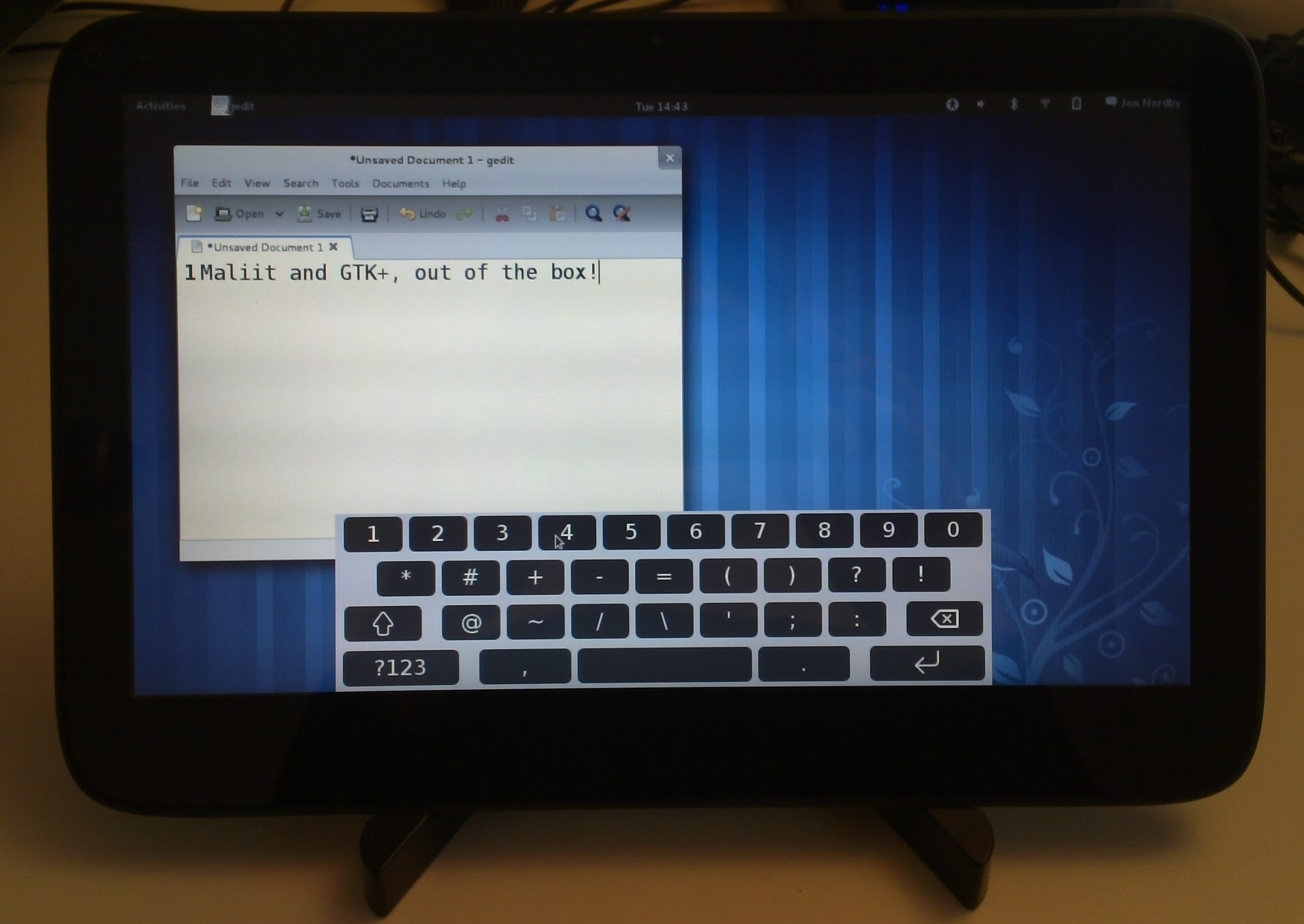
This initial video shows Maliit running in Gnome 3, and demonstrates some of the very basic features provided by Maliit and the standard keyboard shipped with it. The demo is done on a WeTab tablet running a standard Fedora 15 Beta, with the latest Maliit software installed. Jan Arne Petersen is working a bit on  Fedora packages, so hopefully it will soon be easy to install for those who are interested.

Some more info about the features shown in above video:

0. Theming. Using the theming support in the standard Maliit keyboard, it is easy to go from a mockup to ready implemented theming. This theme was based on the mockup from live.gnome.org (by Jakub Steiner I believe?) and done by Michael Hasselmann in a couple of hours. He also has a blogpost on how the theming system works.

1. Typing text.This is of course the number one feature of an on-screen keyboard. There are some essential best-practice and some tricks used in Maliit to be able to get really good reponse time and typing speeds. I hope we will have some blogposts about that soon.

Typing speed can be further enchanced by enabling multitouch support (not working out-of-the-box in Fedora due to missing support further down the stack), or by installing a prediction/correction engine. User feedback can be enchanced with audatory and tactile feedback (requires hardware and driver support obviously).

2. Different languages/layouts, and switching between them. Maliit comes with layouts for over 20 languages, tested and tweaked by usability experts. Latin, Cyrillic, Arabic and Chinese based scripts are covered. The layouts are defined by XML files, so one can easily change them if wanted.

Chinese ZhuyinRussian

Arabic

For more of the features offered by Maliit framework and standard keyboard, see the wiki page. If you are interested in improving Maliit, or its integration in Gnome 3 or other GNU/Linux environment, join the irc channel or mailing list.

Next up; the importance and difficulties of input method integration on touch enabled devices.

2011
03.16

So, it is confirmed, I’m going to LGM 2011! I was at LGM last year, and I expect this year to be just as good. Hopefully I’ll also be giving a talk this time, about MyPaint and/or OpenRaster.

If you are interested in free and open source graphics software, or the production of freely licensed graphical works, you should go too! See the press release for more information, or go straight to submit a talk proposal. If you cannot be there but still want to show your support, please consider donating.

I guess this means I should order the tickets soon…

2011
03.03

I wrote the initial version of this in late January, and after some interations it was merged yesterday to gst-plugins-good, and will be in gst-plugins-good 0.10.33. This solves the feature request I filed in 2009, one of my oldest bugreports in bugs.gnome.org!

What does it do?

cairooverlay allows you to draw arbitrary things on top of a video stream in GStreamer using Cairo. Previously you had to create a custom GStreamer element for that (in C/Vala), but now you can just hook up to some signals, using any programming language with GStreamer/Cairo bindings.

To draw an overlay using this element, you use the “caps-updated” signal to get information about the video stream (like width and height) and the “draw” signal to do the actual drawing. In addition to the Cairo context, the draw signal passes you the timestamp and duration of the buffer, so you can also do animations.

For more info see the included example application or the documentation (should be updated soon). Here is the obligatory screenshot showing the example application drawing a heart onto a test videostream:

GStreamer + Cairo = <3

The heart is actually animated, so I guess I should have had a video. But you’ll just have to trust me that it is very cute, or grab the code yourself!

2011
02.12

Last weekend I was in Brussels for my first FOSDEM.

Friday I attended a planning meeting for this years Desktop Summit. Several things were on the agenda, the most pressing being the website and the call for papers which both should be finished in the coming month. I was tasked with organizing the call for BoF/meetings/devrooms. In a broader scope, I see my role as making sure relevant non-KDE and GNOME projects know they are welcome. People involved in such projects are welcomed to submit talk proposals, or apply for space for a BoF/meeting just like a KDE/GNOME project, but for anything to come out of it we need to communicate this properly.

Didn’t go to a lot of talks, but I had plenty of good discussions in the “hallway track” and in the evening events. Especially good was meeting up with Claudio Saavedra to discuss Meego Input Methods and the Gtk+ integration he is working on. I hope I was able to help him a bit in getting started.

Attended the Libre Graphics Meeting planning dinner sunday evening. I don’t know if I’m able to make it to the conference yet, so I did not have that much to contribute, but I let them that Libre Graphics projects are welcome to the Desktop Summit. And that I might try to organize a MyPaint workshop at LGM.

2011
02.08

Officially an engineer!

It is official, the diploma for my Bachelors degree in Electronics Engineering arrived late last week. I guess that means I’m done with studying for a while!

2011
01.23

It is not well communicated, but you can apparently write your own “tabs”/”panes” for the panel/toolbar found in the Meego Netbook UX. Hopefully this blogpost helps a tiny bit*.

As stated by the libmeego-panel/docs/README in the source tree of mutter-meego there are convenience APIs for GTK+ and Clutter based implementations. But it seems you can also just use the DBUS API, in case you prefer Qt or something else. I found this out by searching though meego.gitorious.org after someone asked on #meego

*Since this should be documented in the platform API, I’ve of course filed a bugreport.

2010
11.29

When I got back from the Meego conference, I tried building MyPaint on the Ideapad I got (which runs Meego Netbook 1.1).

I was pleasantly surprised to find pygtk in the core repositories.  numpy on the other hand was missing but that was easy to build from source. Buut, it seems that pygtk is built without numeric support, making MyPaint unusable; numeric support is used to get access to the pixels in pygtk pixbufs, which we need for several central things.
I have of course filed a bug for this so hopefully it will be resolved soon. If not I will have to provide alternative pygtk packages using the community OBS. In any case, expect it to be working soon.

I also hope to adapt MyPaint’s UI to the handset and netbook/tablet form factor, but this is only talk so far.

2010
11.29

Like most of my colleagues at Openismus I was present at the first Meego conference in Dublin. As usual, I’m probably the last to blog about it. See for instance Friedrich’s post, Andre’s post or Chris’ very detailed post.

The conference was held at the Aviva stadium, a huge sports stadium just outside Dublin center. Untraditional venue choice, but it was quite nice and the organization was very good.

The conference schedule was packed; 2 days with 5 parallel tracks and the third day done unconference style with some 7 parallel sessions (btw, all the talks are available online). Many of the technical talks I went to were a bit on the light side in my opinion, which is forgivable considering how new the whole Meego thing is (or maybe I just chose badly). However, the keynotes and some less-technical talks (and some discussions in the “hallway track”) gave me much better understanding of what Meego actually is and aims to be.  Which is arguably just as important.

The schedule was fairly packed in the evenings as well, with opening reception and  “Openismus conference dinner” at the closest pub the first day, party at the Guinness Storehouse the second and a Ireland-Norway friendly in football (which Norway won!) the third. In addition, the official conference hotel had a “hacking area” available 24-7, which was pretty popular.

To give Meego a little boost,  all the participants were given a Lenovo Ideapad S10-t3 tablet netbook/laptop. In exchange we had to install Meego Netbook Edition 1.1 on and promise to develop cool applications for. Lucky me also got a Nokia N900 so I can do development for that form-factor as well. :D

What is Meego? (my interpretation and some musing)

At least Intel seems to have a very clear vision of  Meego as an open operating system and software platform that will make it easy for people to deliver new and innovative products in the embedded/mobile/space.

Meego explicitly targets a broad range of device classes, from set-top boxes to in-vehicle-infotainment to handsets to netbooks, a very bold move. Personally, I think the key to succeeding in that aspect is to attract the vendors with expertise in each device class and have them drive development. The project has done a decent job at that so far with Intel, Linpus, et.c. for netbook, Nokia for handset, the GENIVI consortium for IVI and so on.

Another thing the Meego project explicitly supports is for vendors shipping devices to do customization. This is basically a prerequisite to be able to attract them at all (as they naturally want to differentiate their products), but brings additional challenges in delivering a consistent platform and brand. The compliance specification work presented at the conference leads me to believe that the project is on the right path here though.

As an application platform Meego is based around Qt (with Qt Quick). This is a decent platform, but what is most lacking in order to attract application developers is probably shiny, attractive devices, and people using them. Hopefully they will be here soon…

All in all, I like what I see. Time will show how well the project succeeds, there are certainly exciting times ahead!

2010
11.29

In learning Qt, I of course needed to get some experience with the newest and shiniest bits of Qt: Qt Quick.

One of the things I’ve done with that is to make a simple application, an image viewer called Imago. The code can be found at Gitorious. It is a bit different from typical Qt Quick applications as it is not a mobile application but rather targets the desktop. Thus I’m using standard desktop UI concepts like drop-down menues, and ordinary file-chosers.

Imago - single image view

Imago - single image view

Imago - "traditional" view

Imago - "traditional" view

Imago - grid view

Imago - grid view

The lists can be “flicked” through using the pointer, or using the scroll wheel. Moving between the views that show multiple images and the single-image view has a small animation.

Implementation

In a Qt Quick application two languages and runtimes are involved; C++ and the declarative language that forms the basis of Qt Quick, QML. Qt supports bi-directional communication between the two using a number of metods.
In my case I chose to make a QObject class that  maintains all of the central state in the application. This includes things like what folder is currenty open, the images in that folder, which image is currently focused/selected. All these attributes are implemented as QObject properties, and are notifyiable (meaning they have an attached signal that you guarantee to emit each time the value changes). Exporting this object to QML then allows these properties to be used in property bindings, or for one to connect to the notification signals.
So in Imago QML is basically used as a “stupid” UI layer for the image view. Other things, like window title and drop-down menues are handed by the C++ side, but by using the signals and properties of the same object.

Writing a desktop application means that one cannot assume a fixed window size like people tend to do for mobile device applications. With setting the resize property of the QDeclarativeView (the widget that displays the QML stuff) to QDeclarativeView::SizeRootObjectToView and using anchor layouts throughout this is possible, but it took me a good while to get working properly. Mostly because the concepts are new, and most (all?) the examples in the documentation seem to neglect this aspect.

The grid and traditional view are actually implemented in different QML files (though the delegate for the images in the list is shared). I did this to test how having several UIs would be like, and for a simple application like this it works out just fine.

Where to now?

Imago right now is very simple,  and could benefit from some added features and some designer love. I also just found a bug in the traditional view that needs to be fixed. I have documented these things in the README file in case someone is interested. As I have moved my focus over to other projects, I probably wont be taking this application much further, at least not at this time.